

Crypto Trading Orders Explained | Most market participants obsess over price prediction, yet completely ignore execution mechanics. You can analyze charts and set the perfect Limit or OCO order on a centralized exchange (CEX), but when extreme volatility strikes, strategy often falls apart. During a flash crash, CEX servers frequently overload, and a standard Stop-Loss can trigger catastrophic slippage, draining your capital instantly.
Let’s be explicitly clear: Centralized exchanges are the correct venues for reading charts, analyzing order books, and deploying complex conditional orders. However, relying exclusively on them during peak market panic is a massive structural risk.
This execution guide eliminates beginner jargon to dissect how advanced traders utilize market, limit, stop, and OCO orders to control their entries and automate exits. More importantly, it reveals how to recognize when these traditional order books fail—and how to execute a rapid, sovereign cross-chain escape when you need to be released from centralized gatekeepers entirely.
What Are the Different Types of Orders?
Understanding how to enter or exit a trade is more important than most people realize. Price is only half the story (how you execute matters just as much). Below are the key crypto trading orders every serious trader should know.
Market Order
A market order tells the exchange: “Get me in or out now, at the best available price.” It’s instant. No waiting, no conditions. You just hit buy or sell, and it executes immediately using the current order book liquidity.
When to use it:
- You need to enter or exit fast, especially in volatile moments.
- You’re okay with a bit of slippage — small losses from price movement while your order is filling.
The catch? If liquidity is low or you’re trading a large position, you might get filled at worse prices than expected. It’s convenient, but not always precise.
Limit Order
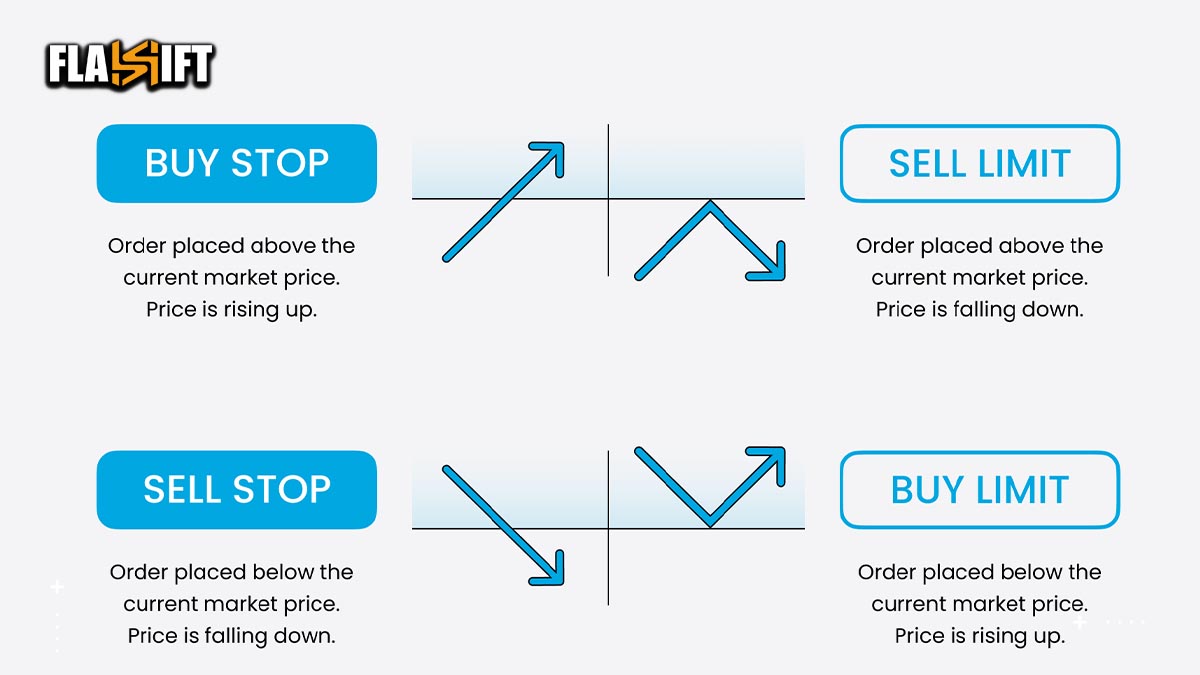
A limit order lets you name your price. You’re saying: “I’ll buy (or sell), but only if the market hits this price or better.” It doesn’t guarantee execution, it only fills if the price reaches your limit.
When to use it:
- You want more control over your entry or exit.
- You’re not in a rush and can wait for the market to come to you.
- You’re setting trap orders above/below key levels.
Example: Bitcoin is trading at $60,000. You place a limit buy at $58,500. It won’t execute unless the price drops to that level.
Limit orders are perfect for strategic entries, but they can leave you on the sidelines if the market never touches your price.
Stop Order (Stop-Loss / Stop-Market)
A stop order is a risk-management tool. It activates a market order once a specific trigger price (the stop price) is hit. It’s often called a stop-loss when used to limit downside, but you can also use it for breakout entries.
When to use it:
- To automatically exit a trade if price moves against you.
- To buy into momentum if price breaks a key level.
- To sleep at night without staring at charts.
Example: You bought ETH at $3,000. To limit losses, you place a stop-market sell at $2,800. If ETH drops to that level, the order fires and sells at market price — whatever that may be.
Keep in mind: in fast crashes, stop orders can execute at worse-than-expected prices due to slippage.
OCO (One Cancels the Other)
OCO orders combine two orders (typically a limit and a stop) and only one can execute. Once one fills, the other is automatically canceled. It’s like setting a take-profit and stop-loss in one shot.
When to use it:
- You want to automate both your exit targets and safety net.
- You can’t monitor the charts constantly.
- You want to avoid emotional exits.
Example: You hold BTC at $58,000. You set an OCO:
- Limit sell at $62,000 (take profit)
- Stop-market sell at $56,500 (cut loss)
If BTC hits $62K, you lock in profit. If it drops to $56.5K, your stop activates. Either way, the other order disappears to prevent accidental double selling.
OCO orders are extremely useful (and underused) by casual traders. If your platform supports them, use them.
Mistakes to Avoid in a Volatile Market

When markets move fast, bad habits get expensive. Knowing your crypto trading orders is important. Using them wrong in high-volatility conditions is where most traders burn capital. Here’s what to avoid when the market gets shaky:
-
Using Market Orders Blindly
In a pump or dump, market orders can slip hard. You think you’re buying BTC at $58K… but low liquidity or bots push you into $59K+. Always check the order book before slamming “buy now.” If precision matters, use a limit order instead.
-
Setting Stop Orders Too Tight
A tiny wick can trigger your stop and leave you watching the market bounce back without you. In volatile conditions, give your stops breathing room—or you’ll get chopped out of every decent setup.
-
Forgetting to Use OCO Orders
Trying to set a manual take-profit and stop-loss is a juggling act you’ll drop eventually. OCO orders automate both sides of your exit strategy. Use them. Especially when you can’t babysit your positions.
-
Placing Limit Orders That Never Fill
Don’t get too cute with sniper entries. If the market doesn’t dip to your limit order, you’ve missed the move. In fast trends, consider laddering your orders or using partial market entries.
-
Ignoring Order Type Behavior During Crashes
In extreme moves, even your stop-loss might not fill at the price you hoped for. That’s not a bug—that’s slippage. Know how your exchange handles crypto trading orders under stress. Read their fine print before it’s too late.
-
Trading Without a Plan, Just an Order Button
No trading order can fix bad strategy. If you’re jumping in just because things are moving, you’re not trading—you’re reacting. Orders are tools, not tactics.
Bottom line
Volatility exposes sloppy execution. Mastering crypto trading orders isn’t about knowing definitions—it’s about using them smartly when the heat turns up. Place your entries with intention. Set your exits like a professional. And don’t let panic touch your keyboard.
⚡ The Emergency Exit: CEXs for Charting, Flashift for Execution
Let’s be clear: Centralized Exchanges (CEXs) are the correct venues for reading charts, analyzing order books, and deploying complex Limit or OCO orders. However, relying on a CEX during extreme market volatility is a massive structural risk.
When a flash crash occurs, CEX servers frequently overload and lock users out. Even if you have a Stop-Loss set, cascading liquidations can cause catastrophic slippage, filling your order far below your target.

Flashift is not a charting or day-trading platform.
It is a specialized, sovereign execution terminal designed for rapid portfolio rebalancing and emergency market exits. When traditional exchanges freeze or trap your capital, Flashift provides a direct, non-custodial escape route.
🛡️ Zero-Approval Cross-Chain Escape: When you need to exit a crashing altcoin into a stablecoin (USDT) instantly, Flashift allows you to execute direct cross-chain swaps without logging in, fighting server overloads, or relinquishing self-custody.
To protect your capital during high-volatility exits, our AI routing engine performs rigorous post-trade analysis. It actively identifies and blacklists liquidity providers employing predatory bait-and-switch tactics—whether they attempt to force high slippage mid-trade or suddenly demand unexpected KYC verification. Secure your portfolio, maintain your financial sovereignty, and execute your exit in under 3 minutes.
FAQ
- Why did my stop-loss trigger, but I got a worse price than expected?
That’s slippage. Stop orders become market orders when triggered, and in fast markets, the execution can lag behind the price you set.
- Can I place a limit order that never fills—and still get liquidated?
Yes. If you’re using leverage and your limit order doesn’t fill, price can move against you and trigger liquidation while your order just sits there.
- Is OCO available on every exchange?
No. Some platforms don’t support OCO natively. You’ll need to either set two separate orders manually or use third-party tools to simulate it.
- What happens if I’m offline when my stop order should trigger?
If your stop is already on the exchange, it will still activate. But if it’s only set in your wallet or third-party tool, it won’t trigger unless you’re connected.
- Should I avoid market orders entirely during volatile events?
Not always. Market orders are useful when speed matters more than price—like breakout entries or panic exits. Just be aware of the tradeoff.